
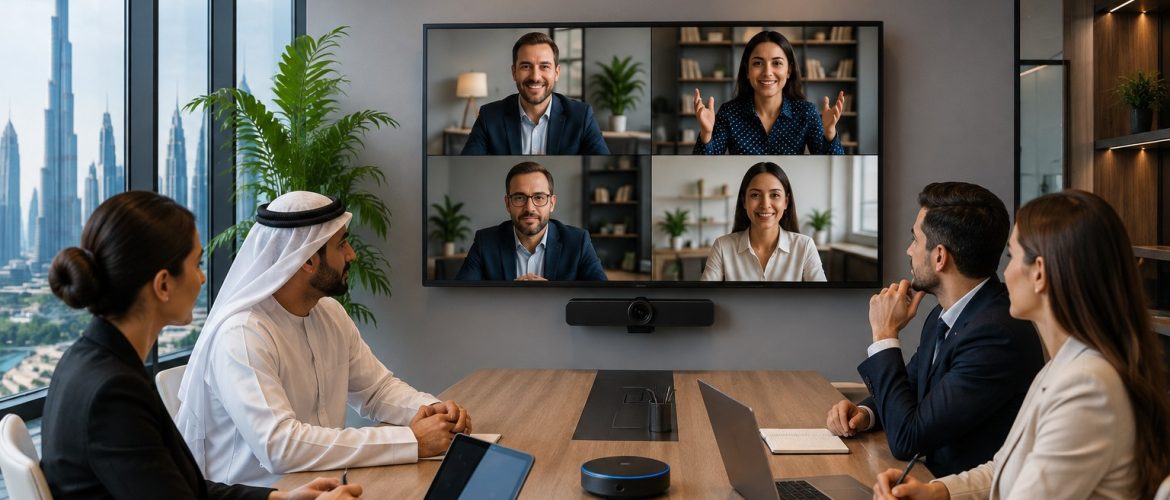
Hybrid working has changed the way businesses communicate. Employees, clients, partners and management teams may now join the same meeting from offices, homes, different Emirates or locations outside the UAE.
This flexibility creates opportunities for faster communication and better collaboration, but it also creates new technical challenges.
A poorly configured Zoom Conference Call can result in unclear audio, weak video, connectivity problems, echo, background noise and difficulty sharing presentations. These issues can quickly affect productivity and create an unprofessional experience for clients and participants.
For organisations that depend heavily on virtual communication, reliable video conferencing requires more than simply installing Zoom on a laptop.
Businesses need to consider the meeting room, cameras, microphones, speakers, displays, network connectivity, software configuration and overall user experience.
A professionally planned Zoom Conference Call Setup can help organisations create meeting environments that are easier to use, more consistent and better suited to modern hybrid work. MAK Group’s Zoom setup service includes areas such as hardware installation, software configuration, calendar integration, room setup and staff training.
What Is a Zoom Conference Call?
A Zoom Conference Call is an online meeting where participants communicate through video, voice, screen sharing and other collaboration tools.
Participants can join from different locations using devices such as:
- Desktop computers
- Laptops
- Tablets
- Smartphones
- Dedicated conference-room systems
- Professional meeting-room cameras and audio equipment
For a small internal meeting, using a laptop may be sufficient.
However, boardrooms, conference rooms, training rooms and executive meeting spaces usually require a more professional setup.
The quality of the experience depends not only on the Zoom application but also on how the room, network and audiovisual equipment work together.
Why Reliable Hybrid Meetings Matter
Hybrid meetings combine participants who are physically present in the meeting room with participants who join remotely.
The objective is to create an experience where everyone can communicate effectively regardless of their location.
Problems appear when remote participants cannot hear people clearly, cannot see everyone in the room or struggle to follow presentations.
Similarly, people inside the meeting room can become frustrated when remote participants constantly disconnect or experience poor audio.
A reliable hybrid meeting environment can help businesses improve:
- Internal collaboration
- Client meetings
- Management communication
- Project discussions
- Sales presentations
- Staff training
- Interviews
- Supplier meetings
- Regional communication
- International collaboration
The technology should support the meeting rather than distract participants from it.
Key Components of a Reliable Zoom Conference Call Setup
Creating a professional Zoom environment requires several components to work together.
1. High-Quality Camera
Video quality influences how professional a meeting appears.
A standard webcam may work for individual users, but larger meeting rooms often require dedicated conference cameras.
Depending on the room, businesses may consider cameras that provide:
- Wide viewing angles
- High-resolution video
- Automatic framing
- Speaker tracking
- Pan, tilt and zoom capability
- Suitable coverage for larger rooms
Camera placement is equally important.
A high-quality camera positioned incorrectly can still create an uncomfortable meeting experience.
Ideally, participants should appear naturally positioned rather than looking significantly above or below the screen.
2. Professional Microphones
Audio is often more important than video.
Participants may tolerate slightly reduced video quality, but a meeting becomes extremely difficult when conversations cannot be heard clearly.
Microphone requirements depend on factors such as:
- Room dimensions
- Number of participants
- Seating arrangement
- Acoustic conditions
- Table configuration
Different environments may require tabletop microphones, ceiling microphones or integrated conferencing devices.
The objective is to capture voices consistently without forcing participants to speak loudly.
3. Clear Speaker System
Remote participants must also be heard clearly inside the room.
Speakers should deliver speech naturally without producing distortion, excessive volume or echo.
In smaller rooms, integrated speakers may be sufficient.
Larger meeting spaces may require additional audio equipment depending on room design and the number of participants.
Professional Audio Visual Solutions can bring together video conferencing, displays, wireless presentation systems and other technologies into a more consistent meeting environment.
4. Suitable Display
The display is the main visual connection between local and remote participants.
A conference room may use:
- Commercial displays
- Large-format screens
- Multiple displays
- Interactive displays
- Video walls in specialised environments
Display size should be selected according to viewing distance and room dimensions.
In some conference rooms, a dual-display configuration can be useful.
One screen can show participants while another displays a presentation, spreadsheet or shared document.
5. Reliable Internet Connectivity
Even excellent cameras and microphones cannot compensate for an unstable network.
A Zoom Conference Call depends on consistent internet connectivity.
Businesses should assess:
- Available bandwidth
- Wi-Fi coverage
- Wired network availability
- Network congestion
- Router and switching infrastructure
- Connection stability inside meeting rooms
Where possible, important conference-room systems should be designed with reliable network connectivity in mind.
Network performance should also be tested during periods when office traffic is high.
Designing the Meeting Room for Zoom
Technology is only part of the solution.
The physical meeting room itself affects the quality of video conferencing.
Businesses planning professional Meeting Room Solutions should consider video conferencing, AV technology and room fit-out as connected parts of the same environment. MAK Group provides meeting-room solutions that combine conferencing and professional room technologies for hybrid collaboration.
Lighting
Participants should be clearly visible on camera.
Avoid placing strong light directly behind participants because this can make faces appear dark.
Lighting should be balanced across the room wherever possible.
Background
Meeting-room backgrounds should look professional and should not contain unnecessary visual distractions.
Corporate branding can sometimes be incorporated subtly into the space.
Seating
Participants should be positioned where they can see displays easily while remaining visible to the camera.
Large tables may require careful microphone and camera planning.
Acoustics
Hard walls, glass surfaces and empty spaces can create unwanted echo.
Acoustic treatment may improve speech clarity in rooms where sound reflection is significant.
Choosing the Right Zoom Setup for Different Room Sizes
Not every meeting room requires the same equipment.
Small Meeting Rooms
Small rooms may accommodate approximately two to six participants and generally require a straightforward conferencing setup.
Typical requirements might include:
- Display
- Conference camera
- Integrated microphone and speaker
- Zoom-enabled computer or meeting-room device
The main priority is simplicity.
Employees should be able to enter the room and begin a meeting quickly.
Medium Meeting Rooms
Medium spaces require greater camera coverage and stronger audio pickup.
The setup may include:
- Larger display
- Wide-angle or tracking camera
- Multiple microphones
- Dedicated speakers
- Room controller
- Wireless presentation capability
The system should accommodate both physical and remote participants comfortably.
Large Boardrooms and Conference Rooms
Large meeting rooms require more detailed planning.
Depending on the environment, solutions may involve:
- Multiple cameras
- Ceiling microphones
- Professional speakers
- Dual displays
- AV control systems
- Integrated presentation technology
- Room scheduling
- Advanced conferencing controls
Large rooms should be planned around actual seating positions and communication requirements rather than choosing equipment independently.
Calendar Integration and Easier Meeting Management
One important part of a professional conference-room experience is making meetings simple to start.
Calendar integration can help users view scheduled meetings and access conference sessions without manually entering lengthy meeting details every time.
A well-configured environment reduces the number of steps employees must follow.
This is particularly valuable for businesses with multiple meeting rooms or employees who host frequent external meetings.
MAK Group includes calendar integration among the elements available within its Zoom Conference Call Setup services.
Screen Sharing and Presentations
Many Zoom meetings involve more than conversation.
Participants may need to present:
- PowerPoint presentations
- Spreadsheets
- Websites
- Reports
- Product demonstrations
- Project plans
- Videos
- Design concepts
- Technical drawings
Screen sharing should therefore be simple and reliable.
Meeting rooms can also incorporate wireless presentation technologies so employees can share content without constantly changing cables or adapters.
This is particularly useful when different employees bring different laptops into the same room.
Security Considerations for Zoom Meetings
Businesses should consider meeting security as part of their communication strategy.
Meeting organisers should understand available controls and establish internal procedures for important or confidential discussions.
Good practices may include:
- Controlling meeting access
- Managing participant permissions
- Using appropriate authentication
- Controlling screen sharing
- Managing recordings carefully
- Reviewing meeting invitations before distribution
- Avoiding public sharing of confidential meeting information
- Maintaining appropriate user access
Organisations handling sensitive client, financial, legal or operational information may require additional internal security policies.
The appropriate approach depends on the organisation, industry and type of communication involved.
Common Zoom Conference Call Problems
Even well-equipped meeting rooms can experience problems when systems are not correctly configured.
Echo During Meetings
Echo can result from multiple microphones or speakers being active in the same physical room.
Correct room configuration helps reduce this issue.
Remote Participants Cannot Hear Everyone
This is often caused by insufficient microphone coverage.
The microphone system should be selected according to room size and seating configuration.
Poor Camera View
A camera may show only part of the table or fail to capture participants sitting at the sides.
Camera coverage should be tested from actual seating positions.
Weak Video Quality
Video quality can be affected by lighting, camera quality and network performance.
Each area should be checked rather than assuming that the camera alone is responsible.
Difficult Meeting Controls
If employees require several remotes, complicated instructions or repeated technical assistance, the meeting-room design may be unnecessarily complex.
Professional systems should aim to make everyday operation simple.
How to Improve Your Existing Zoom Conference Call Setup
Businesses do not always need to replace everything.
An existing room may be improved by identifying the weakest parts of the current system.
Start by asking:
- Is the audio clear?
- Can remote participants see everyone?
- Is the internet connection stable?
- Is screen sharing easy?
- Are meeting controls simple?
- Do employees frequently request IT assistance?
- Is the display large enough?
- Does the room produce echo?
- Can users start scheduled meetings quickly?
The answers can help identify where upgrades are required.
For additional practical recommendations, businesses can also review MAK Group’s Zoom Conference Call Tips to Improve Remote Collaboration.
Standardising Zoom Meeting Rooms Across an Organisation
Companies with multiple conference rooms may benefit from standardisation.
Using a consistent approach across rooms can make systems easier for employees to understand.
For example, organisations can standardise:
- Meeting controls
- Camera operation
- Display layouts
- Microphone systems
- User interfaces
- Room booking processes
- Support procedures
Employees can then move between meeting rooms without having to learn a completely different setup each time.
Standardisation can also make maintenance and future upgrades easier to manage.
Why Professional Installation Matters
Conference-room technology contains multiple interconnected elements.
A problem with any single component can affect the entire meeting experience.
Professional installation helps ensure that cameras, audio devices, displays, connectivity and software are configured as one system.
The installation process should consider both technical performance and everyday usability.
MAK Group’s Zoom setup offering covers hardware installation, software configuration, room setup and staff training, helping businesses address the complete conferencing environment rather than treating each component separately.
Supporting Hybrid Work in UAE Businesses
Businesses in the UAE frequently communicate with employees, customers, suppliers and partners located across different cities and countries.
Hybrid meeting technology can help organisations maintain regular communication without requiring every participant to be physically present.
A professional Zoom Conference Call environment can support:
- Dubai and Abu Dhabi office communication
- Regional GCC meetings
- International client meetings
- Remote employee collaboration
- Vendor presentations
- Online training
- Management discussions
- Recruitment interviews
The most successful systems are normally those that employees can use confidently without constant technical assistance.
Planning a New Zoom Conference Room
Before purchasing equipment, businesses should define their requirements.
Consider the following:
- How many people normally use the room?
- What are the room dimensions?
- Where will participants sit?
- Will external clients regularly join?
- Are presentations frequently shared?
- Is recording required?
- Are multiple displays necessary?
- What existing AV equipment is available?
- What network connectivity is available?
- Will the system need to integrate with calendars?
- Who will support the equipment?
- Could the room requirements expand in the future?
Answering these questions makes it easier to design a system around genuine business requirements.
Frequently Asked Questions
What equipment is required for a Zoom Conference Call?
For basic meetings, a computer, camera, microphone, speakers and internet connection may be enough.
Professional meeting rooms may require dedicated cameras, microphones, speakers, commercial displays, room controllers and integrated AV equipment.
Can Zoom be used in a professional conference room?
Yes. Zoom can be integrated into conference-room environments with professional video, audio, display and control equipment.
How can businesses improve Zoom meeting audio?
Start by reviewing microphone placement, speaker configuration, room acoustics and the number of active devices in the room.
Professional microphones may be required for medium and large meeting spaces.
What causes echo during Zoom meetings?
Echo can occur when several devices in the same room use active microphones and speakers or when room acoustics create excessive sound reflection.
Can Zoom conference rooms support presentations?
Yes. Participants can share digital content during meetings, and professional rooms can also incorporate dedicated presentation and wireless content-sharing technologies.
Can an existing meeting room be upgraded?
In many cases, yes.
Businesses can assess existing cameras, displays, microphones, network infrastructure and AV equipment to determine what can be retained and what should be upgraded.
Is professional Zoom installation useful for businesses?
It can be particularly valuable for organisations operating dedicated meeting rooms, boardrooms or multiple conference spaces because the camera, audio, display, network and software components need to work together consistently.
Final Thoughts
A successful Zoom Conference Call depends on much more than opening the Zoom application.
Reliable hybrid meetings require the right combination of room design, audio quality, video coverage, displays, internet connectivity, software configuration and simple meeting controls.
Businesses should design conference rooms around how people actually communicate.
Small meeting rooms may need a simple integrated setup, while large boardrooms may require multiple cameras, professional microphones, larger displays and advanced AV control.
The objective remains the same: create a meeting experience where technology works quietly in the background while participants focus on the conversation.
For businesses planning to install, improve or standardise their conferencing environment, MAK Group provides professional Zoom Conference Call Setup, Meeting Room Solutions and Audio Visual Solutions for modern business environments in the UAE.
Businesses can also contact MAK Group to discuss their meeting-room and conferencing requirements.


No comments yet.