

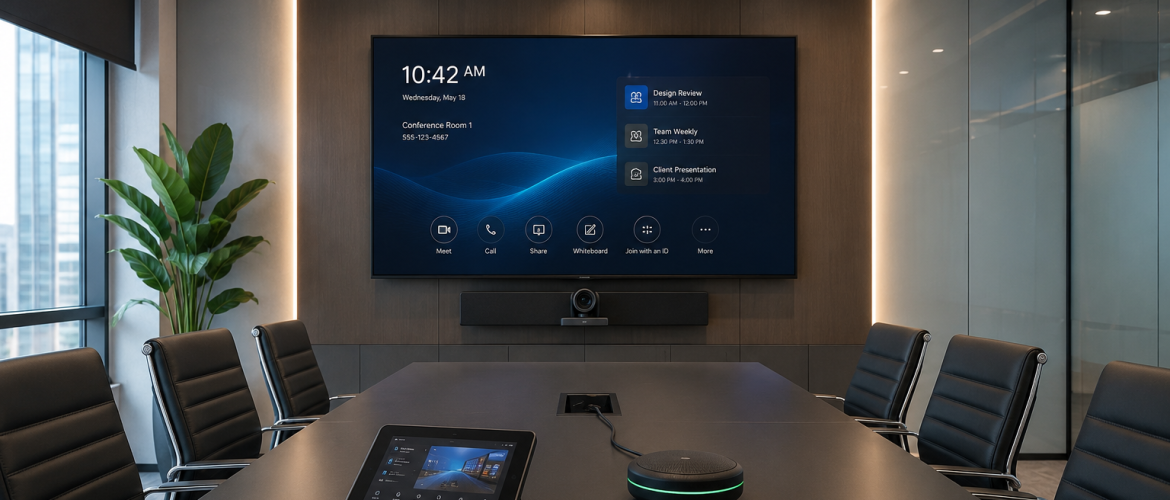
Introduction
Modern conference rooms are central to communication, planning and decision-making. They are
used for client presentations, leadership meetings, project reviews, training sessions and hybrid
discussions with participants in different locations. Advanced conference room solutions bring
audio, video, presentation, control and collaboration technology together so that these activities
can take place with fewer interruptions.
A conference room should not require a technical specialist every time someone wants to join a
call or share a presentation. The goal is to create a professional space that is easy to operate,
delivers clear communication and supports both in-room and remote participants.
What Are Conference Room Solutions?
Conference room solutions are integrated technology systems designed for formal meeting and
collaboration spaces. They may include video conferencing cameras, microphones, speakers,
displays, projectors, wireless presentation tools, interactive screens, room booking panels and
smart control interfaces.
The final design depends on the size and purpose of the room. A compact conference room may
use a video bar and one display. A large boardroom may require ceiling microphones, multiple
cameras, dual displays, digital audio processing and a programmed control system.
Clear Audio Is the Foundation of Collaboration
Participants can tolerate a temporary reduction in video quality more easily than unclear sound.
When voices are distant, echoing or interrupted, the meeting becomes difficult to follow.
Microphone selection should match the seating layout and room acoustics. Table microphones may
suit some boardrooms, while ceiling microphones keep tables clear and provide wider coverage.
Speakers should distribute sound evenly so that all participants can hear remote attendees without
excessive volume.
Digital signal processing helps manage echo, feedback and background noise. However, room
finishes also affect performance. Glass, stone and other hard surfaces may require acoustic
treatment to improve speech clarity.
Video That Keeps Everyone Visible
Camera placement should allow remote participants to see the people in the room naturally.
Cameras may use wide-angle views, auto-framing, speaker tracking or preset positions.
In larger rooms, one camera may not provide suitable coverage. Multiple cameras can show the
presenter, audience or whiteboard as required. Displays should be large enough for the viewing
distance. Dual displays are useful because one screen can show shared content while the other
shows remote participants.
Wireless Presentation and Content Sharing
Users often enter conference rooms with different laptops and devices. Wireless presentation tools
allow them to share content without searching for the correct cable or adapter.
The solution should support the organisation’s security requirements and provide clear
instructions. Some businesses also need wired connections for guests, high-resolution content or
restricted networks. A flexible system can support both options.
Smart Controls and One-Touch Operation
A well-designed conference room should provide a simple control experience. Users may need to
start a scheduled meeting, adjust volume, select a presentation source, control cameras and switch
displays.
These functions can be combined into a touch panel or room controller. The interface should use
clear labels and avoid unnecessary options. Standard controls across several rooms help
employees operate the technology with confidence.
Support for Hybrid and Remote Meetings
Hybrid meetings require equal attention to people inside and outside the room. Remote
participants should hear every speaker and see the discussion clearly. In-room users should be
able to view remote participants while also working with shared content.
Calendar integration and one-touch joining can make scheduled meetings easier to start. The room
may also support Microsoft Teams, Zoom or other approved platforms. The design should consider
guest meetings, cross-platform calls and device management.
Room Booking and Space Management
Room booking panels placed outside conference rooms can show availability and allow authorised
users to reserve spaces. Integration with calendars helps reduce scheduling conflicts.
Organisations with many meeting spaces may also use analytics to understand room utilisation.
This information can support workplace planning, identify underused rooms and guide future
investments.
Conference Room Solutions for Different Spaces
Small conference rooms normally need a compact camera, microphone and speaker system, one
display and simple wireless sharing. Medium rooms may require a higher-quality camera,
additional microphones, dual displays and a dedicated room controller.
Executive boardrooms often need premium audio, discreet microphones, multiple cameras, larger
displays, custom controls and strong integration with the room interior. Training rooms may
require interactive displays, recording and flexible presentation positions.
Integration with Lighting, Blinds and Room Environment
Advanced conference rooms can integrate AV controls with lighting, blinds and selected room
functions. A presentation mode may dim specific lights, close blinds and activate the correct
display source.
Automation should remain practical. Users must still be able to make simple adjustments. The
control design should support the meeting rather than attract attention to the technology.
Security and Network Considerations
Conference room devices are part of the organisation’s technology environment. Cameras, room
computers, control processors and management platforms may connect to the network.
IT and AV teams should coordinate device access, updates, user permissions, network
segmentation and support procedures. Recording and streaming features should follow the
organisation’s privacy and information policies.
Design and Installation Process
A successful project begins with a site survey and user requirements. The design team should
confirm room size, table layout, ceiling conditions, lighting, acoustics, display positions, network
points and cable routes.
After approval, the project may involve drawings, equipment selection, coordination with fit-out
contractors, installation, programming and commissioning. Final testing should cover audio, video,
content sharing, platform connectivity and controls.
Training, Monitoring and Maintenance
User training should explain how to join calls, present content, adjust basic settings and request
support. IT teams may need additional technical training.
Central monitoring can help support teams identify offline devices, software issues and room
faults. Preventive maintenance reduces the risk of failure during important meetings and protects
the organisation’s investment.
Benefits for Dubai Businesses
Advanced conference room solutions help businesses communicate with clients, regional teams
and international partners more effectively. They can reduce meeting delays, improve the quality
of presentations and support flexible work models.
MAK Group provides meeting and conference room solutions in Dubai, including video
conferencing, professional room fit-outs and integrated collaboration systems. The solution can be
planned according to room size, business use and technical requirements.
Conclusion
A modern conference room is a complete collaboration environment. Audio, video, displays,
controls and software must work together in a way that feels simple to the user.
Organisations that plan around real meeting behaviour, room conditions and IT requirements can
create conference spaces that improve communication and remain valuable for years.
Frequently Asked Questions
What is the most important part of a conference room solution?
Clear audio is usually the first
priority, followed by suitable video, displays and simple controls.
Can a conference room support both Teams and Zoom?
Many systems can support multiple
meeting platforms, but the exact user experience depends on the selected room technology and
policies.
How long does a conference room installation take?
The timeline depends on room size, fit-out
work, equipment availability and integration complexity.


No comments yet.